via https://youtu.be/g0m2-PGT-5I


from WordPress https://logicinbound.wordpress.com/2017/10/26/best-instagram-bot-in-2017-and-replacement-for-instagress/
In this case study, we’ll give you a step-by-step breakdown of how Logic Inbound was able to propel Redwood Valuations to the front page of Google on short notice to capitalize on a competitor’s acquisition.
Redwood Valuations is one of the largest and most successful providers of 409A valuations in the country, with over 700 clients. They’ve done valuations for firms large and small, including WhatsApp and FitBit.
Silicon Valley Bank, or SVB, was the single largest 409A valuation provider in the country at about 1300 clients. Word got out that SVB was going to be acquired by eShares, an automated valuation shop with fewer clients and a weaker reputation. The first way Redwood heard of this? A client saying they got a weird email from SVB that they should sign off their information over to eShares.
Redwood Valuations knew that this acquisition would have serious repercussions for existing SVB 409A clients. There’s a meaningful difference between the way SVB and eShares operate.
eShares charges 409A customers using a subscription model, despite the fact that 409A customers may not need additional work done on their behalf for several years at a time. SVB and Redwood both used a fee-based model. This led former SVB customers to have serious doubts about whether eShares would support 409A valuations made by SVB. This concern was exacerbated when eShares required those former SVB customers to register with eShares in a very short window of time. The implication was that those who fail to sign up in this window would not be supported.
eShares also claims to have a “fully automated” 409A solution, yet it takes 7 to 10 days to fulfill. That means it can’t really be automated. Instead, Redwood Valuations saw this as an excuse for poor customer service.
The idea was simple: how do we get this information about legitimate concerns in front of current SVB customers? How can we amplify the legitimacy of these concerns while driving traffic toward the strongest competing alternative, Redwood Valuations? If enough current SVB 409A customers or interested investors read about the numerous client concerns regarding this acquisition, Redwood Valuations can claim some of the client attrition for themselves.
Logic Inbound developed a strategy combining concepts from guerilla PR and SEO to get this important information in front of wary SVB 409A customers. The key to this strategy was to act quickly: we had only a matter of days before a formal announcement of the acquisition was expected to happen.
The first step was developing a blog post about the possible SVB acquisition and its problems to host on Redwood Valuations’ own site. We worked with Redwood on this to ensure that the claims we were making were accurate and spoke to the primary concerns of 409A valuation clients. Then we applied our SEO tactics and optimization to the blog to ensure Google would quickly recognize the page as authoritative on the subject of the eShares acquisition.
Next, Logic Inbound distributed a press release pointing to and citing the Redwood Valuations blog post. Because there was little discussion on the relationship between eShares and SVB on the web prior to our blog and press release, our SEO tactics pushed it to immediately claim the top spot on Google.
What’s more, when SVB posted their own announcement, it ranked below the Redwood Valuation links on Google, and it still does as of the writing of this case study.


To read more articles like – Professional Services SEO & PR Case Study – Redwood Valuations 409A, visit logicinbound.com
https://www.logicinbound.com/professional-services-seo-pr-case-study-redwood-valuations/


One of the things that everyone loved about the internet when it first came into being is email. These days, it remains one of the most effective and cheapest marketing tools for businesses regardless of size or years of existence.
While there are numerous email marketing strategies and providers out there, Constant Contact and MailChimp are two of the most popular among smart business owners of today.
Are you about to try your hands on email marketing for the first time or you’re simply not at all that happy with your current provider? Then read on. Below are 3 questions that may be on your mind – the answers to each one can help you determine whether it’s Constant Contact or MailChimp that you should sign up with.
For a business owner like you, it’s always a smart move to check out the many different features – and limitations, too – of an email marketing tool just to see whether it’s the right one for your digital marketing campaign and budget. Fortunately enough, both Constant Contact and MailChimp offer free trial, but only one of them actually offers it for a lifetime!

Signing up with Constant Contact’s free trial allows you explore all of the well-known company’s various campaign types and tools that you can use for your very own advantage. You can even test the effectiveness of campaigns that you have created by sending them to 100 of your contacts.
Unfortunately, the free trial comes to an end after 60 days. But fret not because you will still have access to the various test campaigns you have created, as well as the contacts you have entered. And also, you will still be able to see reports and even work on your drafts.
However, sending them out is no longer possible . . . that is until you are willing to opt for a paid subscription. Once you have paid, Constant Contact gets your email marketing up and running once again.
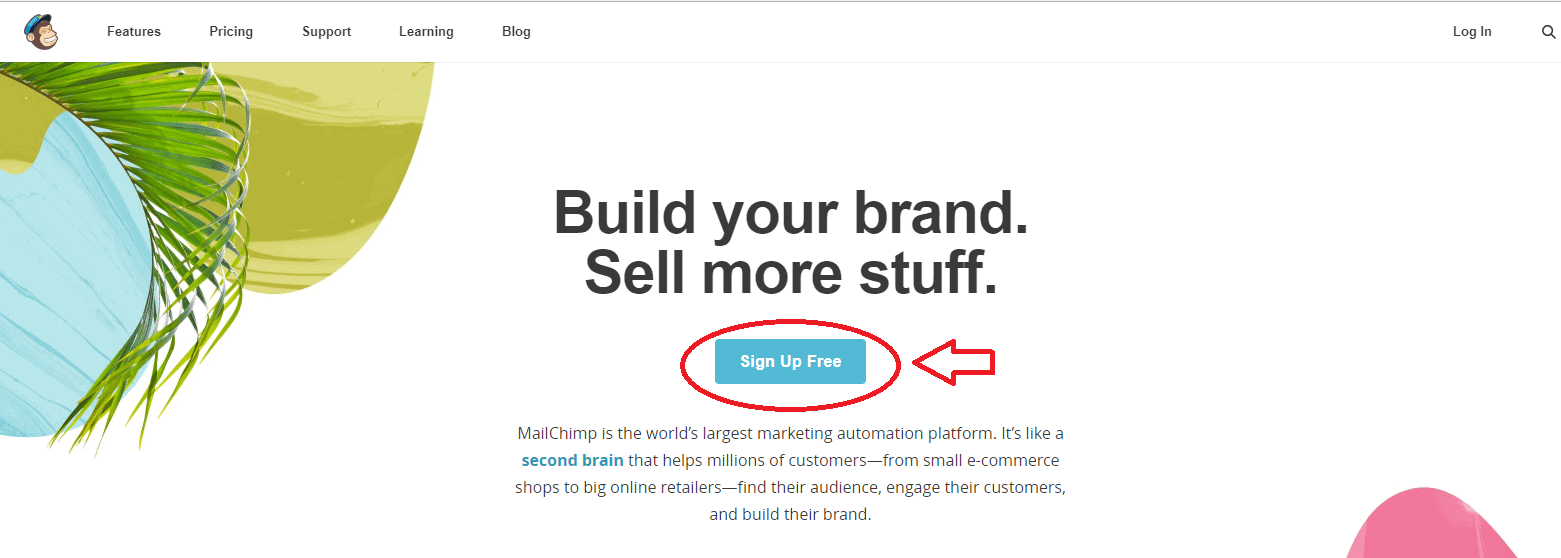
On the other hand, MailChimp offers free trial that actually doesn’t end at all, which means you can take advantage of the various tools available on the said email marketing provider for life and at no cost!
However, there’s a catch: you are limited to only 2,000 subscribers and up to 12,000 emails every month. But if your business is just starting up or a small one, then such provision that comes with free use of MailChimp for the rest of your life is more than enough.
So what happens if one day in the future your business suddenly booms big time which calls for staying in touch with more subscribers and sending out more emails? Then you have to go for a paid account.
Building a customer mailing list for your e-commerce business on Shopify? Take a look at our analysis of Shopify Flow.
As earlier mentioned, you need to shell out money if you want more features to come with your MailChimp account, but the truth is you don’t really have to pay a lot just to enjoy additional perks that can work to the advantage of your venture. Actually, automated email marketing is way cheaper than direct mail, TV and radio ads, and other forms of advertising. For as little as $10 per month, your free MailChimp account can be converted into a more feature-packed plan.
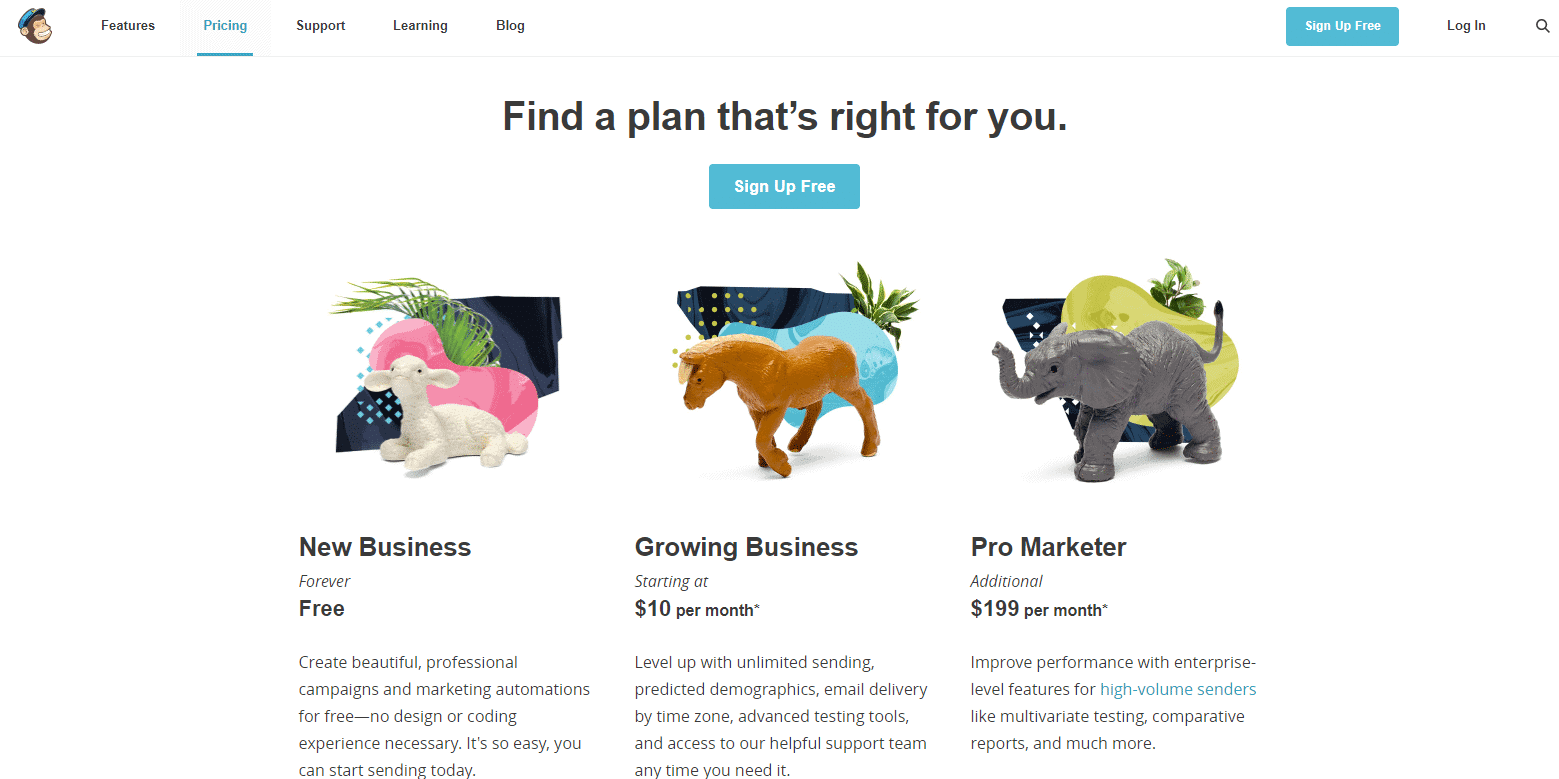
But just as expected, that $10 a month won’t give you everything you need – it will only cover additional 500 subscribers. So what would happen if you had more subscribers? Well, MailChimp will may automatically upgrade your account, of course with added charge. If your numbers of subscribers keep growing, you may be surprised when you get your bill if you are not monitoring it.
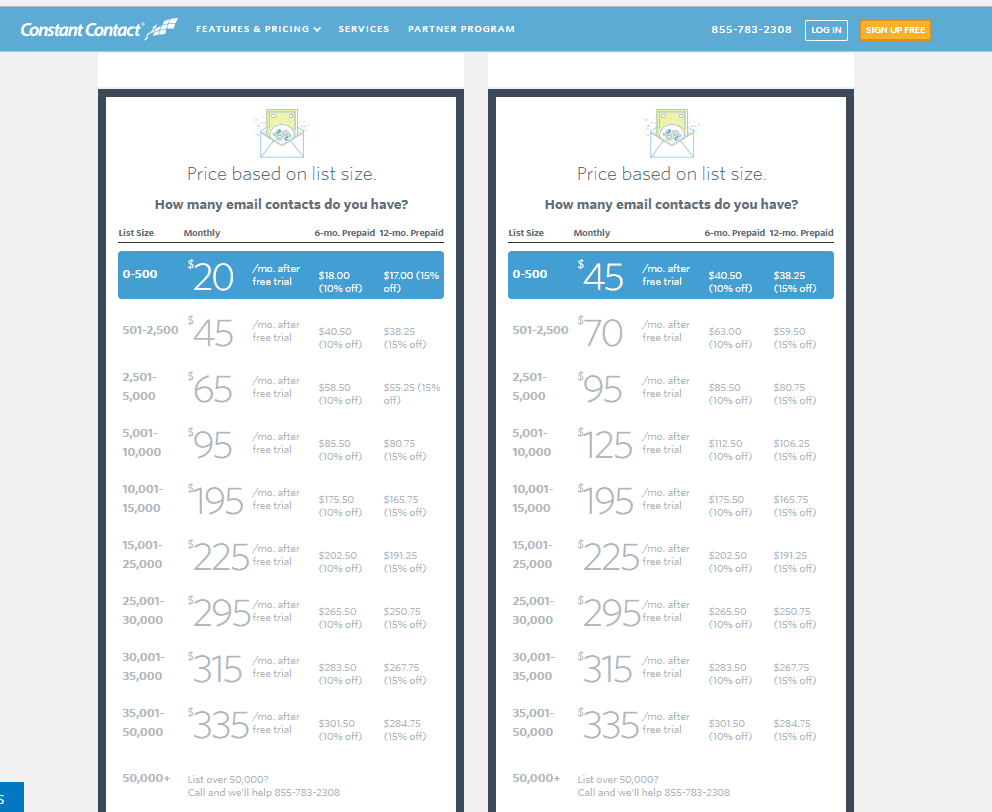
The cheapest plan Constant Contact offers is $20 a month – that’s double the rate of the basic account that MailChimp offers. While that’s definitely more expensive, there are some perks to enjoy for shelling out a little more cash on a paid Constant Contact subscription.
Speaking of picking up the phone, that’s one of the biggest benefits that comes with opting for Constant Contact — there is someone you can contact if you need help. In fact, a customer service representative will actually call you after signing up with Constant Contact to see if you require assistance in setting things up.
If you don’t feel like speaking, then you can simply send Constant Contact an email, or have a chat with a rep. or you may wait for the email to reach you in case you miss the company’s initial call.
Support on a 24/7 basis is something that MailChimp doesn’t offer at all. You can access videos and other information on the company’s website, but you are otherwise on your own.
This doesn’t mean, however, that opening a paid account on MailChimp is a terrible idea. Actually, one of the things that business owners love about MailChimp is it offers something that Constant Contact doesn’t have: trouble-free A/B testing in which you may check which of your two campaigns will perform better.
And by the way, this A/B testing that MailChimp offers is available across the board — you can take advantage of it even with the free plan. Other email marketing providers will actually charge you for using such tool.
Although Constant Contact also offers a variety of mobile apps that allows you to manage your email marketing tactics even when you’re not in front of your computer, MailChimp actually offers more — 7 of them, to be exact. While you may not need all of these mobile apps, it gives you utmost peace of mind to know they’re there should you need them.
Which email marketing service provider should you choose? Because both Constant Contact and MailChimp come with their own respective set of pros and cons, picking the right one can be a very challenging task. Here’s a terrific idea: why not sign up for both for free and see for yourself which one suits your particular business needs? For additional help be sure to check out schools for marketing or enlist the aid of a professional digital marketing company who can advise you on the best strategy for your business.
ABOUT THE AUTHOR
Chris Foerster is a digital marketer with nearly a decade of experience helping businesses improve their online visibility. In his spare time, he enjoys playing guitar, writing on his blog My News Tips or gawking over classic cars.
To read more articles like – Constant Contact vs. MailChimp: 3 Important Questions You’ve Always Wanted to Ask, visit logicinbound.com


LinkedIn profile headlines are important for so many reasons that might not be obvious at first. To understand why these examples are good, you first need to understand what the purpose of a headline is.
Keeping all of this in mind, here are a few example headlines from up-and-coming and viral influencers on LinkedIn. While they’re sorted into a few different categories, every single one of these headlines can help anyone think about how to create their own best headline.
Oh, and if you want to check out what their LinkedIn profiles currently look like, just click on the images!
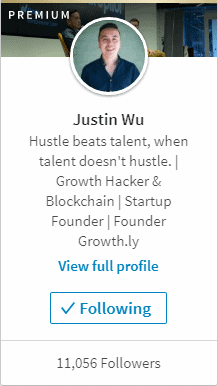
Justin Wu’s headline opens with an insightful blurb about the importance of “hustle” for success compared to merely being talented (fun fact: phrases that flip the first and last word around like this are using a well-known and convincing rhetorical technique called “Chiasmus”). It’s memorable. It tells you something about what he values as a professional.
He then quickly conveys key facts about his professional identity, clearly separating them: he’s a Growth Hacker. He’s involved in the developing blockchain scene. He’s the founder of a Startup. That startup is Growth.ly.
Not only did we learn a ton about Justin and what he’s all about, we see several key terms that are important to his brand as a startup influencer.
Note: If you’re a startup founder, take a look at our specialty marketing services for startup marketing.
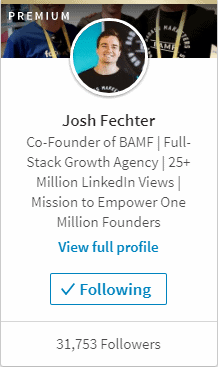
The way Josh Fechter laid out his headline is great for recent students or graduates who have achievements, credentials, and goals that are impressive or valuable.
He lists out his best resume items. For a student or recent graduate, this could be your best scholarship, an impressive paper you published, a particularly prestigious internship, or something that makes you unusual compared to your peers (in a good way).
Josh ends with a “mission statement”, an item that people early in their careers often benefit from stating outright when searching for new opportunities.
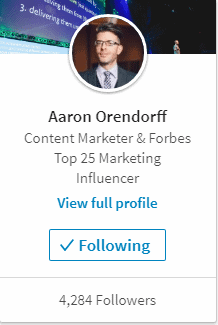
Aaron Orendorff keeps things simple. He has a primary job title and two truly impressive claims to fame. He allows those to absorb all of the attention and doesn’t dilute them by including comparatively unimpressive snippets of information.
This can be a lesson for you as a fresh graduate or recent student. For example, maybe you haven’t done a whole lot yet, but you were a Rhodes Scholar. That’s a big deal! Definitely don’t let people miss your biggest selling point when they visit your profile.
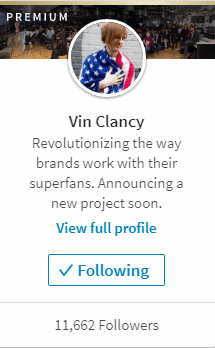
Vin Clancy chooses not to cram as many keywords as possible into his headline, instead making his headline into his personal news ticker. Instead of listing titles and employers, he lists clients and outcomes.
And it’s reasonable to assume some people are still searching for terms like “brands” and “superfans”.
He ends with a “stay tuned” type of blurb that leaves people intrigued: what is the project? This tells people that Vin’s constantly at work on the next big thing. Perhaps they’ll even message him because they’re curious.
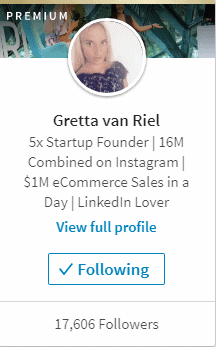
Gretta van Riel focuses on the positive outcomes that she’s achieved in the business world: between the startups, the Instagram volume, and the incredible e-commerce sales, her goal is to dazzle you.
If you were wondering whether Gretta was good at whatever she does, you probably aren’t anymore. By putting the truly unique information front and center (astounding results!), she prompts you to dig deeper into what she has to say and what she’s doing to get those results.
On top of that, she still has key search terms in there; you can bet people are searching for terms like “eCommerce” and “Startup”.
We hope you found this guide to viral influencer headlines helpful! Is there anything you think we should add? Tell us in the comments!
To read more articles like – Awesome LinkedIn Headline Examples from LinkedIn’s Most Viral Influencers, visit logicinbound.com
https://www.logicinbound.com/linkedin-headline-examples-viral-influencers/


Every day, cool videos find their way into Facebook feeds. If you’ve ever wanted to download one that you particularly liked, but couldn’t figure out how, then this guide is for you. It can be something a friend or family member posted, something a page you like posted, or even a video advertisement.
Facebook doesn’t make this process obvious or particularly easy, but it is possible to download Facebook videos on PC, iOS, and Android without using any shady software.
Many apps on iPhone and Android claim to help you download Facebook videos on your phone, but they tend to require clunky implementations, don’t always work as advertised (look at the reviews), and sometimes break when Facebook updates.
For example, here’s a 2-star review from one of these Facebook video downloader apps:
The app is lately having a lot of problems. I’ve been trying to download a video five times and right when I hits 100% the app closes and no video. Also, the search bar on “Liked Pages” doesn’t work, also kicks me out of the app. I spent money to have unlimited downloads because at the beginning I thought it was worth it, yes it took a bit looking and getting to the video but it did the job. Now I’m starting to regret it and will probably will look for another downloader.
This is why we’re not going to tell you to go download someone else’s app to solve this problem. There’s a straightforward way to handle this using your computer.
Here are the steps for a reliable process that will always work on your computer:
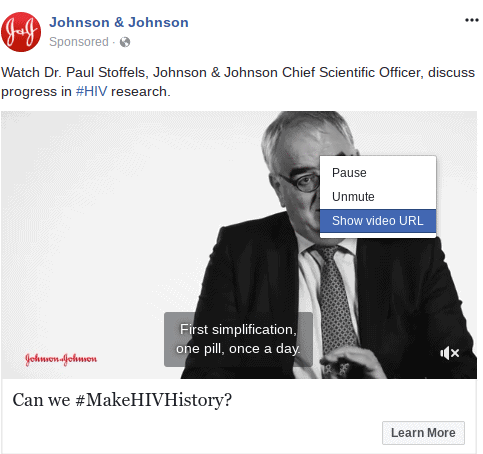


The final steps may vary slightly depending on which browser you’re using, but they’re all pretty similar:
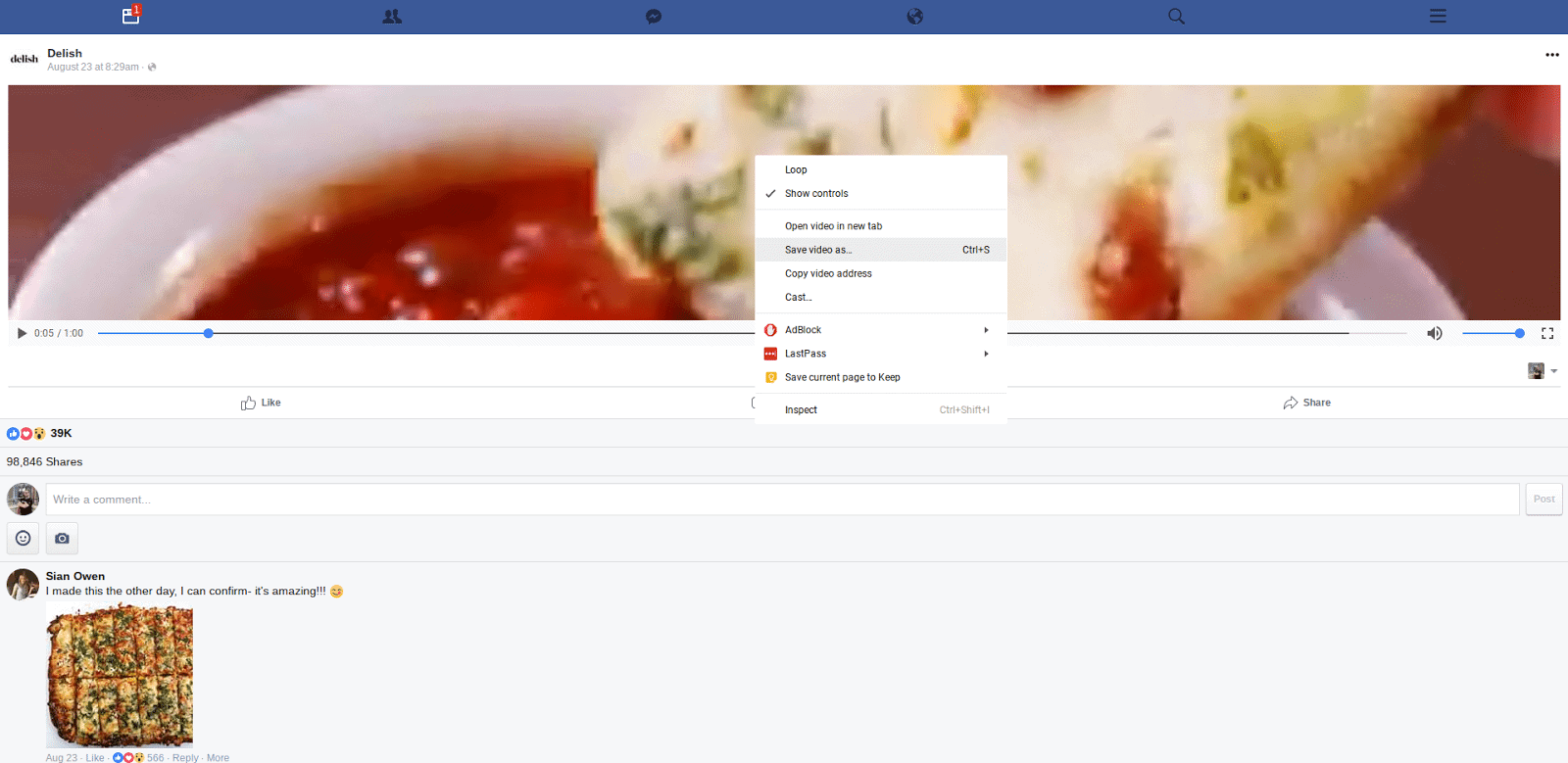
Let us know if this guide was helpful to you or how we could improve it in the comments!
To read more articles like – How to Download Facebook Videos on Your Computer in ANY Browser!, visit logicinbound.com
https://www.logicinbound.com/how-to-download-facebook-videos-on-computer-in-any-browser/


