Thursday, January 4, 2018

Best WooCommerce WordPress Themes in 2018 for your e-Commerce Business

Most e-commerce platforms come with or offer themes in order to make the process of building an online store easier. WooCoomerce offers dozens of themes, which can make picking the right one difficult.

We have broken down the top WooCommerce Themes for WordPress in 2018, both from the free and premium options available.

Best WooCommerce Themes in 2018

WooCommerce updates their theme offerings periodically, so it’s important to check back regularly to see if there are any new themes that suit your website better.

WooCommerce uses a Theme Store to offer themes to its users. There are currently 14 themes in WooCommerce’s theme store, two of which are free. The remaining 12 cost $39 to use.

What is WooCommerce?

WooCommerce is one of the many e-commerce platforms out there right now. While many of these platforms are new or not suitable for all types of businesses, WooCommerce is regarded as one of the best e-commerce platforms available.

WooCommerce is different from other e-commerce platforms because it is a plugin for WordPress. If you already have a WordPress account, you can also download the WooCommerce plugin, which has been installed more than 3 million times. The plugin is free to install, but there will be other costs that come up if you use WooCommerce.

Some additional costs include:

Domain Hosting Varies depending on your needs and how you use WordPress
WooCommerce Subscriptions
Single Site $199
Five Sites $249
25 Sites $399
WooCommerce Memberships
Single Site $149
Five Sites $199
25 Sites $249
WooCommerce Themes Free – $39

As you can see, the exact costs for using WooCommerce can vary widely between one user and anther. There are a lot of options and pricing considerations to take into account when choosing WooCommerce for WordPress as your e-commerce platform for your business.

How do WooCommerce Themes for WordPress Work?

The process for using a WooCommerce theme once you’ve chosen one is quite easy and WooCommerce even offers a step by step tutorial. We’ll break it down here, too:

  1. After logging in at WooCommerce.com, go to the Downloads page.
  2. Click the download icon. A .zip file will download onto your computer.
  3. Now go to your WordPress website. Find Appearance > Themes.
  4. Click Add New.
  5. Click Upload. Select the .zip file from step 2.
  6. Go to Appearance > Themes to Activate the theme.

There are a couple additional considerations when installing and using a WooCommerce theme.

If you got your theme from WooCommerce, you will need to activate it before using it. You will be prompted to activate your theme after installing it. You can activate your theme via the WooCommerce Helper.

You will also need to set up your theme after installing it. This simply means putting all the pieces where you like them and making it look just the way you want. WooCommerce offers documentation on how to set up every one of its themes, free or premium. They can also help with:

Best Free WooCommerce WordPress Themes

We’re going to start with the free WooCommerce themes. All the top themes listed here are totally free to download and use. WooCommerce has a number of free themes it offers that are great for starting out. Some of these themes can even be used long term. They look clean and function well. As long as your store doesn’t need features they lack, WooCommerce’s free themes will serve your website well.

STOREFRONT
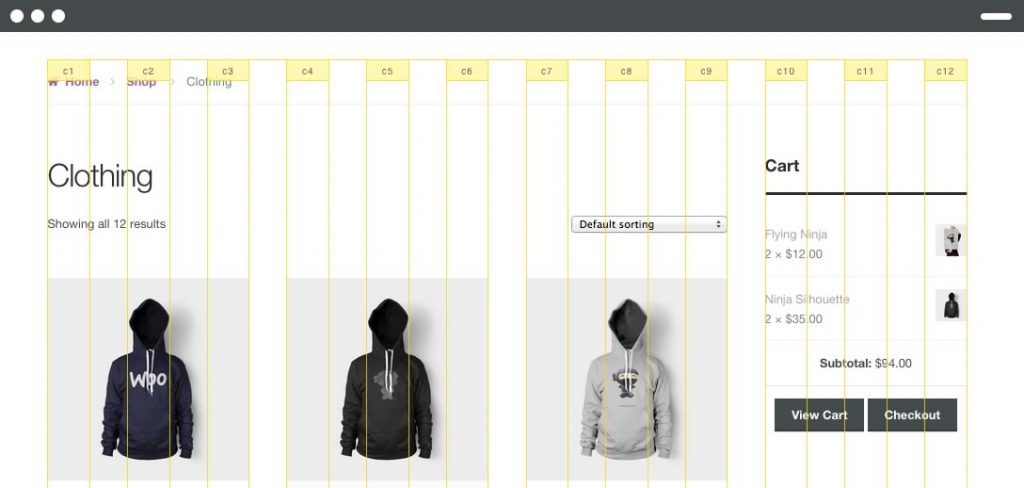
Storefront is the official WooCommerce theme. It is a simple and sleek design that is free to use. It is the foundational theme that child themes are built upon. You will likely need to start at Storefront, but you may be surprised to find that you can stop there, too. The theme is robust enough to be all some sellers need in terms of website design and features.

Features of Storefront include:

  • Zero shortcodes, so there’s no need to worry about any programming
  • Zero sliders, unless you specifically download some
  • Zero page builders to keep things simple
  • Schema markup for improved SEO
  • WooCommerce integration
  • A small, manageable amount of display options to let you customize without getting overwhelmed
  • Flexible CSS grid
  • Responsive design that will adapt to desktop/mobile
  • Based on the Underscores theme, which is the default WordPress theme
  • Localized so you can present your store in any language
  • Built with accessibility options
  • Homepage template is customizable so your Storefront WooCommerce store is unique

BOUTIQUE
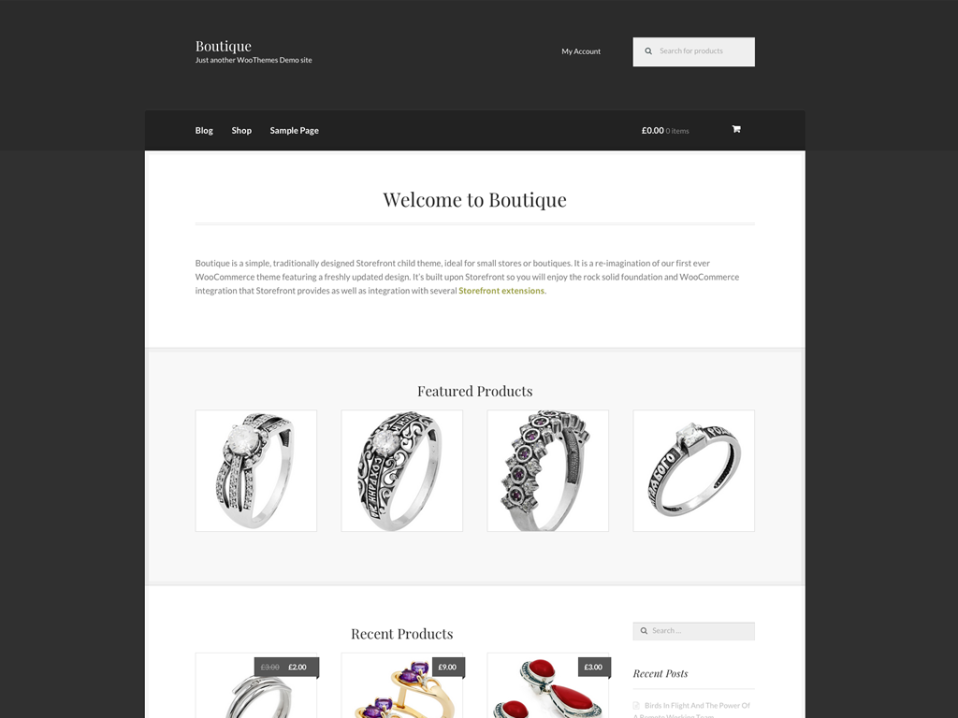
Boutique is a Storefront child theme that is perfect for small stores and, well, boutiques. It is simple and traditional looking, but you can still add your own logo and customize it to make it reflect your store’s needs and personality.

With Boutique, you get all the features and customization options of Storefront, but with a boutique design specifically meant for small stores. Features include:

  • All those included with Storefront
  • A default sidebar for displaying widgets
  • Featured products
  • Built for small stores
  • Easy to set up and use quickly – no need to spend hours or days designing a complicated website

DELI
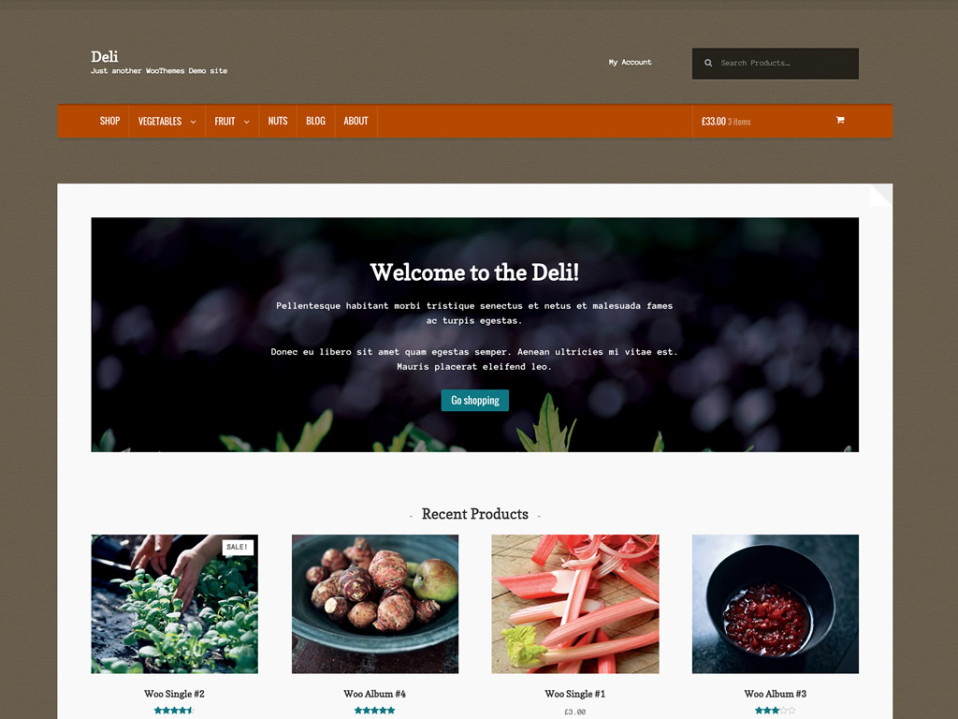
Don’t let its name confuse you. Deli is built for the organic and handmade sellers out there. This theme is actually a great one for people who are choosing WooCommerce over a platform like Etsy for their handcrafted products and artisan gifts.

Deli uses a textured, earthy design that elicits the feel of organic and hand crafted goods. It will appeal to your customers if you are selling products in that field. Features include:

  • All those included with Storefront
  • Earthy, textured design to appeal to customers of hand crafted and organic goods
  • Perfect for small, independent businesses
  • Inspired by nature

Best Premium WooCommerce WordPress Themes

There are only three free themes with WooCommerce. The rest cost $39 to use. Like the other themes, they are built on top of the default Storefront theme.

While you can get WooCommerce themes for free, many of the premium themes are well worth the extra money. They give you more features, more options and more ways to customize the theme and make your store stand out.

GALLERIA
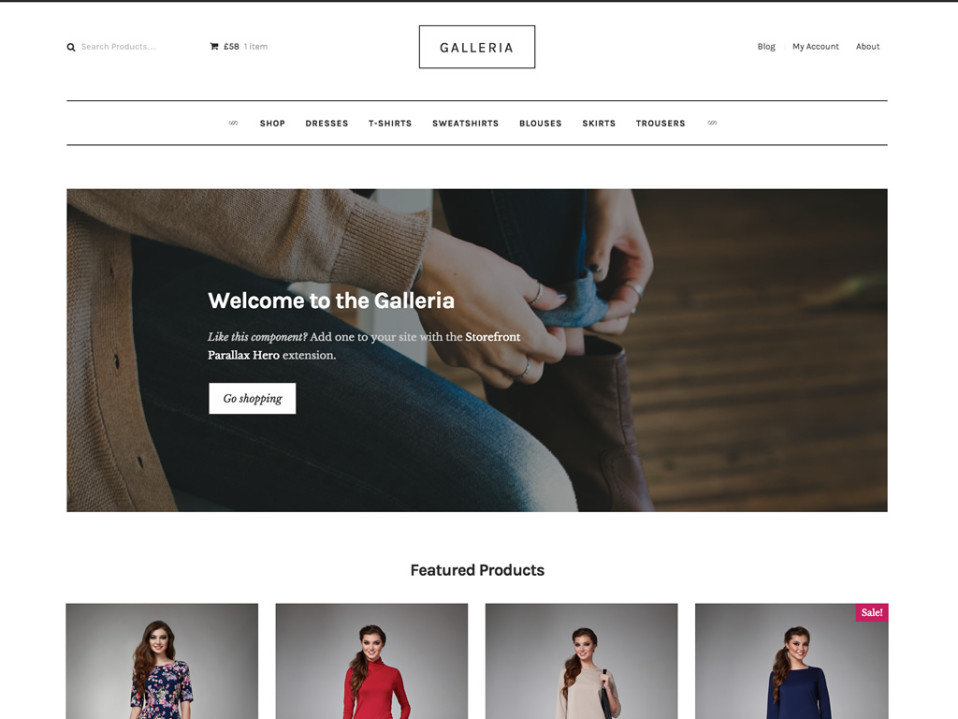
Galleria works with the baseline Storefront theme to product a stellar look for high end fashion and clothing e-commerce stores. It offers a sleek look designed specifically for people selling clothing in the online shop. Features include:

  • Minimalist design
  • Product images on front page
  • Perfect for high end fashion stores
  • Products take center stage with this design

PROSHOP
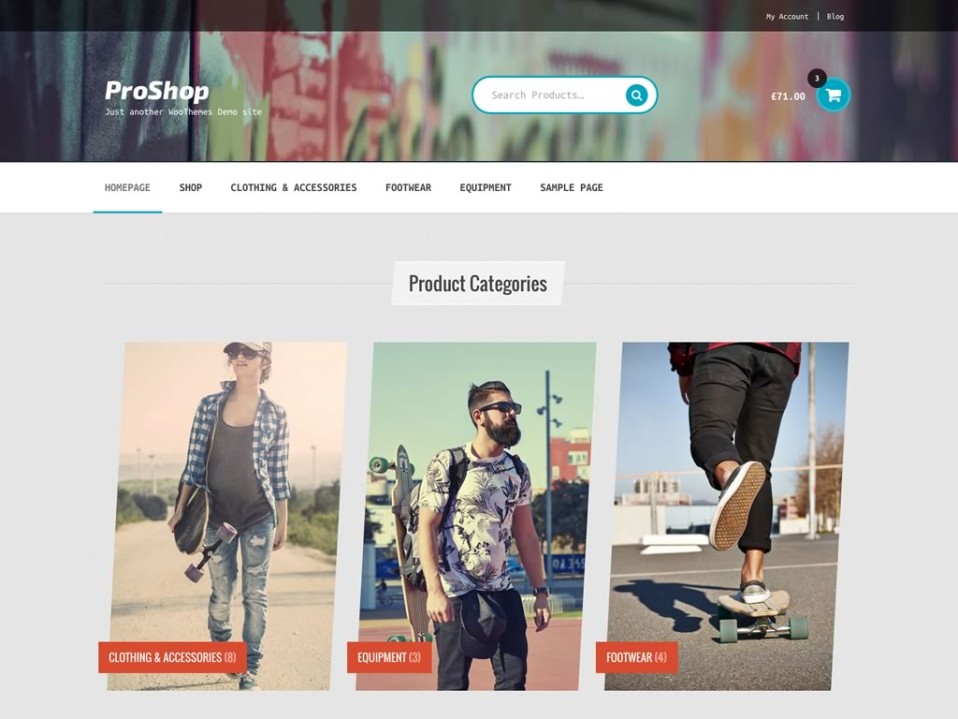
Sell to sports enthusiasts with ProShop. This WooCommerce theme is meant to elicit motion, high speed and fun. It is great for selling sports clothing and equipment. The design of ProSho is urban and textured. Choose the right heading and you’ll have a splashy sporting goods store up and running in no time. Features include:

  • Urban design
  • Perfect for sports clothing and equipment
  • Active aesthetic to give your store character

HOMESTORE
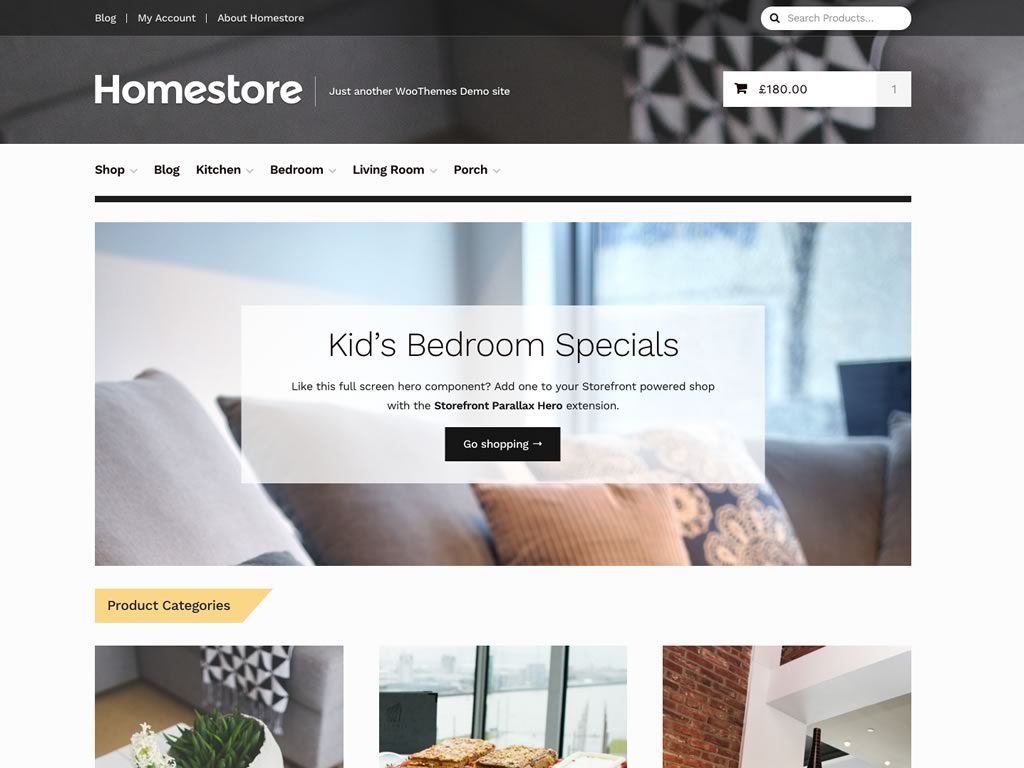
Do you have a home goods or department store? If so, you should definitely consider the Homestore theme. It has a classic department store look with all the features and options of Storefront built it. Modernize department store shopping with this stylish theme for your e-commerce website. Features include:

  • Clean and efficient design
  • Great for independent boutiques or large department stores
  • Classic look and feel that harkens to traditional department stores
  • Compatible with the latest versions of WooCommerce

OUTLET
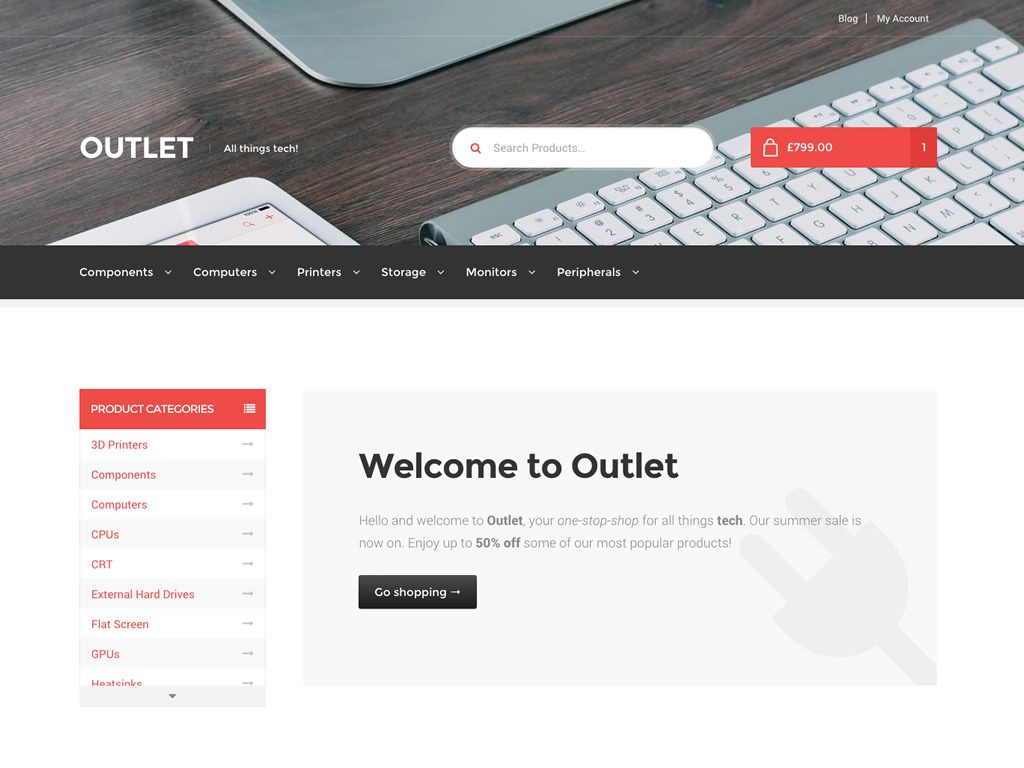
Tech is one of the biggest things sold online. The Outlet theme from WooCommerce is perfect for tech stores online.

People are choosing to buy their tech gear online more and more compared to in physical stores. It’s therefore important to have an e-commerce tech shop that is both easy to navigate and stands out from the crowd. Outlet has a sleek and stylish look that is perfect for tech. The menus and navigation allow customers to comb through sections quickly and easily to find the exact part or piece of hardware they’re looking for. Features include:

  • Great for selling small parts or large pieces of hardware
  • Sleek and stylish
  • Stable core, as it relies on the basic Storefront design
  • Designed specifically for tech stores

TOYSHOP
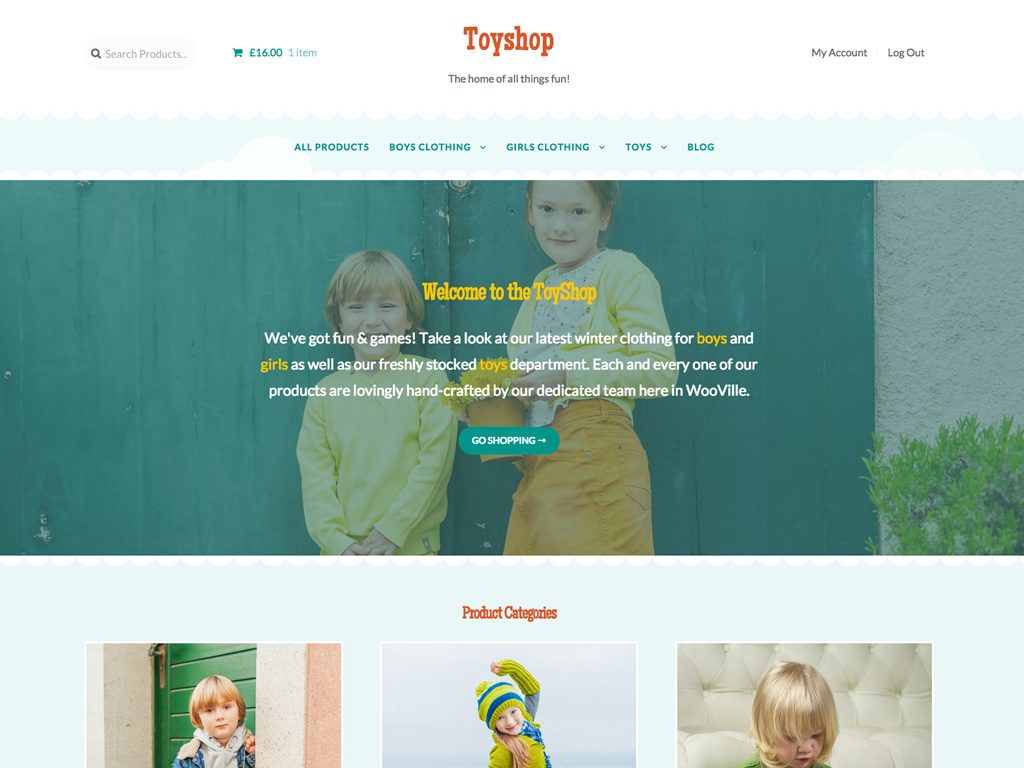
Despite its title, ToyShop is good for more than just people trying to sell toys online. It is aimed at any exciting product, including things like flowers. ToyShop is great for store owners whose customers just want to have fun. The style is light and playful and will visually grab the eye and demand attention. Features include:

  • Great for exciting and fun products of any type
  • Light and playful design that catches the eye
  • Big, bold images for grabbing attention
  • Colorful landscape used as the store’s background by default

BOOKSHOP
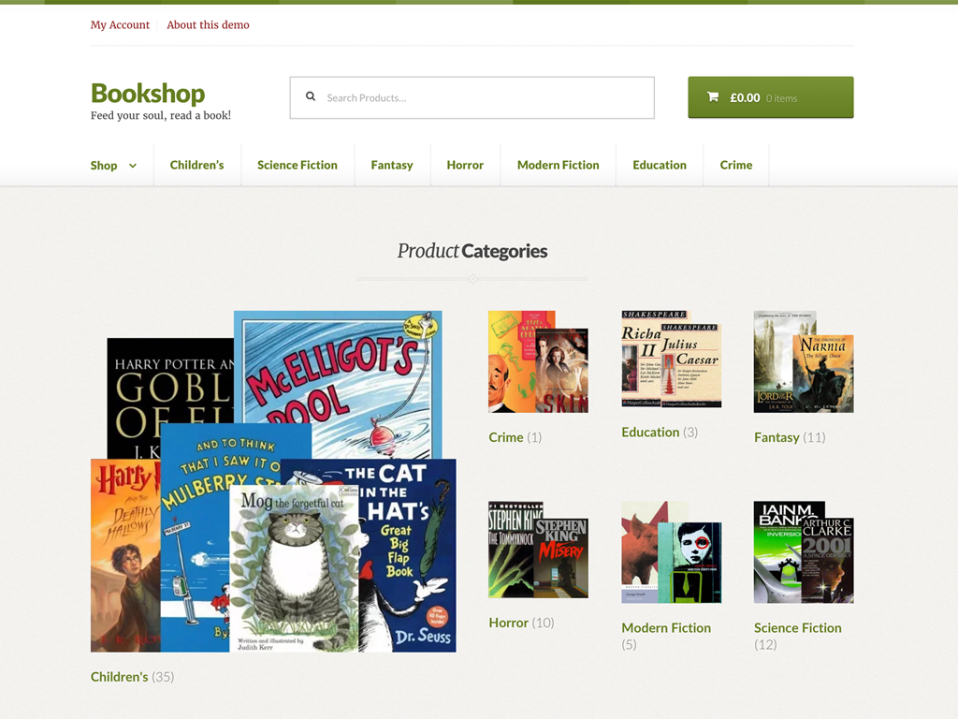
Bookshop will make your small or independent book store look like the biggest book stores out there. Product categories are prominently displayed and book covers look big and beautiful. You can sort books by category in a way that will be familiar and comfortable to customers who shop for books anywhere online. The classic design is also appropriate for other collectibles like wine and figurines. Features include:

  • Classic design
  • Easy to sort products into categories
  • Mimics the look of big book stores
  • Great for any seller of collectable items

Other Themes

WooCommerce has even more themes to offer. These were just a few of our favorites. As you can see, however, the themes tend to be specific to certain uses. Bookshop is great for bookshops; Toyshop best suits toy stores.

It’s worth looking at a range of themes before choosing one, though, as themes are versatile enough to be used for a variety of uses. You don’t need to confine Bookshop only to book sellers.

Here are a few more themes from WooCommerce and what we think they do best:

  • Stationery: A quirky and fun design for sellers of office supplies and/or arts and crafts supplies.
  • Pharmacy: Make sure your health store looks professional with this clean-looking design.
  • Petshop: Selling pet products? Definitely consider Petshop, which has an organic, friendly aesthetic to appeal to pet owners.
  • Arcade: Speak to gamers in their language. Arcade features big, bold images that show off games and gaming products.
  • Hotel: Show off your hotel or bed and breakfast with this clean yet bold theme for businesses selling time, services and accommodation.
  • Bistro: Get that organic look and feel to help sell your consumables with the Bistro layout.

Extensions

Themes are not the only way you can customize the look and feel of your WooCommerce store. Extensions offer another way to get the precise online presence you’re hoping for with your online shop.

Extensions work hand-in-hand with WooCommerce themes. Whether you bought a theme or are using Storefront or one of the other free themes from WooCommerce, you can tack on extensions to further customize them.

Some groups of extensions are related or fit well with a certain theme or store concept. These come bundled together for a flat price. Prices can range but are usually around $70 for an extensions pack. There are also some free extensions to choose from.

Here’s some of our top extensions picks:

Extension Price Description
PayPal Free Accept PayPal, credit cards and debit cards through your store
Zapier $59 Integrate your store with cloud services
WooCommerce Memberships Bundle $299 (varies) Add a membership service to your website
Fulfillment by Amazon $129 Connect your store to Amazon’s fulfillment services
Stripe Free An easy payment system for credit cards
Google Analytics Free See analytics on your store’s performance

There are many other extensions and add ons, but things like analytics and payment processing will get you well on your way to having success with your e-commerce store.

Conclusions

When it comes to the best WooCommerce themes, it depends on your store and what you’re selling. But there’s more to it than just picking out a theme. It’s also important to understand what your store needs. Extensions and add-ons can further enhance and improve your store so that it is perfectly specialized for your customers.

In the end, you will give your customers the best experience by combining theme selection with carefully choosing extensions and other add-ons that will hone your e-commerce store into a thriving online business.

To read more articles like – Best WooCommerce WordPress Themes in 2018 for your e-Commerce Business, visit logicinbound.com

https://www.logicinbound.com/best-woocommerce-wordpress-themes-theme-2018-ecommerce-store-shop-extensions-free-premium/


from WordPress https://logicinbound.wordpress.com/2018/01/04/best-woocommerce-wordpress-themes-in-2018-for-your-e-commerce-business/


Wednesday, January 3, 2018

Best eCommerce Platform for your Business

There are a daunting number of ecommerce platforms to choose from when starting your online business. Choosing the best one for your startup or ecommerce business requires some research.

We’re comparing the best ecommerce platforms for startups and other businesses in 2018 and beyond. After reviewing some of the top platforms out there for ecommerce, we’ll pinpoint where certain platforms excel in terms of pricing, themes, ease of use and other factors.

If you already have a platform in mind, check out our head to head comparisons of Shopify and Etsy, Shopify and Volusion, WooCommerce and Magento, and more.

Best Ecommerce Platform in 2018

In order to pick the right ecommerce platform for your business, take a look at some of the top brands. It is likely that business owners moving into ecommerce have already heard of many of these platforms, but simply haven’t dived any deeper into learning about them.

Many of these platforms offer different levels of pricing in order to cater to a wider range of ecommerce businesses. Some even have free versions. However, lower cost often means fewer special features and add ons. Businesses with very specific needs may find they need to pay a little more to ensure they get all the features they require for their ecommerce business.

Another major consideration is how much effort and time a business can put into their ecommerce platform. Some platforms come with themes and apps to make the work of website construction and management minimal. Others benefit from some amount of coding and website building knowledge. Those who are comfortable with that additional work will get more customized experiences from their ecommerce platform, though. This is often worth the extra work.

Some of the top ecommerce platforms that we’ll review here are:

Shopify

The big picture:

Name Shopify
Price Plans range from $9/month to $299/month
For small businesses Has scaled down options
For large businesses Advanced Shopify and ShopifyPlus are designed for high-volume merchants
Themes Free and Paid
Customer Service/Support 24/7 support available
Ease of Use High
Customizability High if you have some coding knowledge

Shopify is one of the largest and best-known ecommerce platforms available right now. It powers more than 500,000 businesses and has more than 1 million active users. A huge amount of commerce happens on Shopify, with more than $46 billion sold on the ecommerce platform.

As a platform, Shopify offers a lot of flexibility. You can fully customize your online store and manage your products and inventory with Shopify. Shopify also has a thriving community where shop owners share tips and knowledge and an app so you can keep track of your store anywhere at any time.

While it is one of the most customizable platforms you can find for ecommerce, it does come at a price. Aside from the monthly rate for a plan, many of the themes on Shopify come at an additional cost, though there are some free ones available.

Wix

The big picture:

Name Wix
Price Plans range from $5/month to $25/month
For small businesses The popular “eCommerce” plan is only $17/month and tailored for small business
For large businesses The VIP plan is better for large businesses but may not meet all their needs
Themes Free and Paid
Customer Service/Support It’s difficult to reach an actual person for help, but there is a support center
Ease of Use Very High
Customizability Low. They are more focused on making their platform easy to use

Wix is all about ease of use. It has a huge amount of free themes and templates you can use to build an ecommerce platform. It even has an artificial design intelligence feature that builds the site for you via Wix’s AI program. It’s harder to find an easier ecommerce platform builder than Wix.

Wix is also very affordable. The baseline plan is only $5/month. Even their most expensive plan is only $25/month. Of course, with this low price and high ease of use comes a cost. Wix isn’t going to have the bells and whistles that fancier platforms boast, but it should be able to satisfy the needs of most small businesses looking for an ecommerce platform.  

BigCommerce

The big picture:

Name BigCommerce
Price Plans range from $29.95/month to $249.95/month
For small businesses The standard option should suit small businesses
For large businesses There is an Enterprise option that is tailored to large businesses
Themes Free and Paid
Customer Service/Support BigCommerce “University” and other resources aim to answer all your questions
Ease of Use High
Customizability High if you have some coding knowledge

BigCommerce is most easily compared to Shopify. Both platforms offer a similar experience when building an ecommerce platform. Like Shopify, BigCommerce offers a range of prices and packages tailored to different types of businesses. The platform is highly customizable if you are comfortable with some light coding. It is also possible to use themes and templates to build your website, but some of these will come at an additional cost.

SquareSpace

The big picture:

Name SquareSpace
Price Plans range from $12/month to $40/month
For small businesses “Professional” version offers a straightforward way to get started
For large businesses “Advanced” version has more features but may not be as powerful as you need
Themes Usable once you have an account
Customer Service/Support 24/7 support available
Ease of Use High
Customizability Medium – customize within templates

SquareSpace is used by everyone from individuals to businesses. It is a little on the simpler end of platforms and not right for large businesses. It is better for individual’s websites, personal blogs and portfolios and small businesses.

SquareSpace is comparable to Wix and WordPress more than a site like BigCommerce. However, it offers many features that are attractive for smaller websites. If your ecommerce business is on the smaller side, SquareSpace will make setting up an online store pretty simple and painless.

WooCommerce

The big picture:

Name WooCommerce
Price Price is hard to pin down. You will need a domain and other tools as well as the plugin. Cost can be high.
For small businesses Because it connects to WordPress, it’s great for small business
For large businesses May be too limited for large businesses
Themes WordPress
Customer Service/Support 24/7 support available
Ease of Use Medium – you need to understand WordPress as well
Customizability Medium

WooCommerce is different from all the other ecommerce platforms on this list because it is a WordPress plugin. This comes with some challenges as well as benefits. In order to use WooCommerce you will need to have some knowledge of how to use WordPress. Because it plugs directly into WordPress, understanding that platform as well is essential.

Also, cost is a bit hard to pin down with WooCommerce. There are costs associated with hosting, WordPress and WooCommerce that can all fluctuate within a range. Any one user’s costs are probably different from any other user’s costs.

OpenCart

The big picture:

Name OpenCart
Price Free to download and install
For small businesses Depends on how you use it
For large businesses Depends on how you use it
Themes None
Customer Service/Support Available under GNU General Public License
Ease of Use Low
Customizability High if you have some coding knowledge

OpenCart is a free piece of software that anyone can download and use. It is meant to adapt to any operating system or ecommerce situation. It does not have much built in to its basic form, though.

OpenCart requires a fair bit of work to use. Many books are available on how to use the platform. If you do have the knowledge and skills to use it, though, OpenCart is a fantastic ecommerce platform. It enjoys success around the world and is one of the most popular ecommerce platforms available.

BigCartel

The big picture:

Name BigCartel
Price Price ranges from free to $29.99/month
For small businesses Designed specifically for small, creative ventures
For large businesses Probably not ideal
Themes Free
Customer Service/Support Help Center
Ease of Use Very High
Customizability Medium

BigCartel is a great platform for small businesses and creative independent ventures. They aim to make selling easy for small stores, with a “quick setup” feature that can get an ecommerce store up and running extremely quickly. They also have a range of free themes. Customizability isn’t super high, but apps and add-ons do allow for some flexibility.

The free version is very limited, but even the most expensive paid version is very affordable. While BigCartel is coder-friendly, using the platform does not actually require any coding.

OSCommerce

The big picture:

Name OSCommerce
Price Free (open source)
For small businesses Good
For large businesses Good
Themes None
Customer Service/Support Support Center
Ease of Use Low
Customizability Very High

OSCommerce is free open course software that anyone can download in order to set up an online ecommerce store. About 21,000 live ecommerce stores currently use OSCommerce. OSCommerce also offers more than 8,500 free add-ons that you can download in addition to the platform itself.

Like other open source software, there’s a learning curve with OSCommerce But those who are willing and able to learn how to use the software can get a surprisingly robust ecommerce platform that is genuinely free. Hosting and other costs will fall on you, but once you’re up and running it should be smooth sailing.

Volusion

The big picture:

Name Volusion
Price Ranges from $15/month to $135/month
For small businesses The mini and plus options should be appropriate
For large businesses The premium package may suit your needs
Themes Free
Customer Service/Support Free 24/7 customer support
Ease of Use Medium – some customers have expressed frustration
Customizability Medium – customize within themes

Volusion compares to platforms like Shopify and BigCommerce. For a monthly subscription, you get themes, support and an all-in-one ecommerce platform that is fairly customizable.

As a platform, it is fairly robust. However, some users have complained about being confused by the user interface and having some difficulty figuring out how to build their store. Volusion does offer lower priced plans than some of the bigger ecommerce platforms, however, and offers 24/7 customer support.

LemonStand

The big picture:

Name LemonStand
Price Price ranges from $19/month to $199/month
For small businesses Ideal
For large businesses Probably not appropriate. The “professional plan” only allows up to 1,000 orders per month
Themes None
Customer Service/Support Difficult to use
Ease of Use Medium – you will have to create your own themes
Customizability Very high

LemonStand targets developers who want to fully customize their ecommerce experience. Such users will find a lot to like in LemonStand. It is fully customizable, top to bottom. Those who want to touch every button and blank space on their site will enjoy this platform.

However, there is a price associated and developers could use open source software to get nearly as much customizability at no cost.

3dcart

The big picture:

Name 3dcart
Price Ranges from $19/month to $229/month
For small businesses Appropriate
For large businesses Can scale
Themes Free and Paid
Customer Service/Support 24/7 support available
Ease of Use High – professional web design packages available
Customizability High

3dcart offers a wide range of options for whatever sort of business you run. It’s most basic plan is literally called a “startup plan” and is great for small businesses trying to get established in the ecommerce realm. 3dcart does not limit the number of products you can sell, no matter the size of your business.

One unique feature of 3dcart is its professional web design service. 3dcart offers a range of themes to get you started and the flexibility to customize those themes using CSS. However, if you don’t have CSS training or the time to customize your site, you can use their professional web design service to customize your website.

SparkPay

The big picture:

Name SparkPay
Price Defunct
For small businesses N/A
For large businesses N/A
Themes N/A
Customer Service/Support N/A
Ease of Use N/A
Customizability N/A

SparkPay is a lesson is the fickleness of ecommerce and business in general. SparkPay was set up by Capital One bank but has since been shut down. SparkPay will only exist until Jan. 31, 2018, after which it will no longer be supported.

Many things in ecommerce come and go. Platforms that are a hit for a few months soon fall by the wayside. SparkPay is a great example of why stability is important. Platforms like Shopify that have been around a decade or more have proven they can withstand the test of time in the difficult world of ecommerce.

Magento

The big picture:

Name Magento
Price Price ranges from free to enterprise
For small businesses The free version is appropriate for small businesses
For large businesses Enterprise version should work even for large businesses
Themes Free and Paid
Customer Service/Support Customer support services
Ease of Use High
Customizability Medium

Magento is similar to platforms like BigCommerce and Shopify. They offer free and paid themes to help you get started, then leave the details of your ecommerce website up to you. There is a free version that is suitable for many small businesses. This can be a big draw, as it will save small businesses a lot of money when they are developing their online businesses.

Magento doesn’t have the extensive support resources of, say, Shopify, which has a larger community and teaching videos. Still, it is a solid platform that can make establishing an ecommerce platform affordable.

UltraCart

The big picture:

Name UltraCart
Price Price ranges from $49.95/month to $229.95/month
For small businesses The small business package is customized for startups
For large businesses The large plan is right for most bigger businesses
Themes Available
Customer Service/Support Support and tutorials available
Ease of Use High
Customizability High

UltraCart tailors its plans for the type of business using them. Starting with small businesses, it offers more features and sales until you reach the large business level.

UltraCart is also easy to use, with a visual builder that doesn’t require any coding knowledge. You can design visually in a way that is intuitive to most people. UltraCart also has video tutorials and documentation available in its support center to help you learn how to use its website builder.

CoreCommerce

The big picture:

Name CoreCommerce
Price Price ranges from $19/month to $600/month
For small businesses Has many lower-cost plans for smaller businesses
For large businesses The higher end plans can suit large businesses
Themes Responsive themes available with all plans
Customer Service/Support Phone number for support readily available
Ease of Use High
Customizability Depends on plan

CoreCommerce has a huge range of plans available, more than most other platforms. This makes it suitable for just about any business looking to break into ecommerce and start up a store. The amount of choices can be a bit dizzying, though, and CoreCommerce’s own website is not the most appealing. This reflects poorly on the options it can give to its customers.

However, if you are willing to sort through the massive amount of information and difficult formatting on their website, you are almost sure to find the plan that is right for your business.

Best Ecommerce Platform for Small Business

Small businesses have different needs than larger businesses and individuals. There is a tough balance to strike between getting all the features you need to grow your business while not breaking your budget right away.

Some of the best platforms for small businesses are:

  • Shopify
  • Magento
  • WooCommerce

Shopify has been in the business for a very long time. It is one of the most successful platforms out there and still gets good reviews from users. It offers light and reduced cost plans for small businesses that aren’t too expensive. And Shopify’s themes allow for a large amount of customizability.

Magento is similar to Shopify, but can take more time to learn and master. But this learning curve comes with the benefit of even higher customizability than Shopify. Magento can allow you to customize more of your website, if you’re willing to spend more time with it.

WooCommerce is an interesting option for small business. It connects right into WordPress. Small business owners who already use WordPress for their website will find a lot to love with WooCommerce.

Best Ecommerce Platform for Startups

Starups have slightly different needs than small businesses. While there is a lot of overlap in between the two, startups are more likely to be innovators and risk takers. We recommend the following platforms for startups:

  • 3dcart
  • LemonStand

3dcart literally offers a “starup plan” that is aimed at startup businesses. They are focused on startups and other small businesses and tailor certain experiences toward this.

LemonStand is a platform for web developers who want to fully customize their web development experience when it comes to their ecommerce business. This is good for startups who are trying to innovate and customize. Many startups who are breaking into the business world with something new and creative will appreciate the openness of LemonStand.

Of course, the needs of all startups are different. The big players like Shopify can still work for startups who have the budget for more standard platforms.

Best Free Ecommerce Platform

When cost is the determining factor, you may need a free ecommerce platform in order to get started. Try one of these:

  • Magento Open Source
  • OpenCart
  • OSCommerce

Magento has many paid options, but its open source free option is also worth considering. You can get many of the benefits of Magento without the cost.

OpenCart offers a basic package for free that you can further customize in order to fit your needs. The OpenCart marketplace offers add-ons if you do find you need more features and have some money to spend on them.

OSCommerce not only offers a free platform, but free add-ons as well. The app marketplace allows you to build a lot of features into your website. As far as a free platform goes, OSCommerce offers a lot of additional options.

Best Ecommerce Platform for SEO

SEO is often the job of you, the business owner, but there are platforms that help you with SEO as you build. Here are some of our picks:

  • WooCommerce
  • Shopify
  • Magento

WooCommerce, because it integrates into WordPress, comes with a lot of strong SEO features built right in. WordPress will give you feedback on your SEO right in pages and posts. This makes it easy to visually tell if your SEO on any given page or post is strong. This takes the pressure and thinking out of SEO. It will soon become second nature.

Shopify and Magento are similar when it comes to SEO. They both offer tools, add-ons and apps that can help you figure out your SEO.

However, how successful your SEO is on any of these platforms comes down to some extra work on your part. None of these platforms can do SEO perfectly for you. You will have to invest some of your own time and resources in order to get the best SEO possible out of any ecommerce platform.

So What is the Best Platform for an Ecommerce Website?

That depends on how you plan to use it.

For general use, Shopify is hard to beat. It has been an ecommerce leader for a long time because it has been easy to use, customizable and affordable for more than a decade. There is a reason it is so popular.

For startups and small businesses, WooCommerce has a lot to offer by integrating with WordPress.

For those who need to save money, OSCommerce is completely free to use and offers free add-ons to further customize your ecommerce platform.

For SEO, Shopify and WooCommerce both have a lot to offer, but the ultimate success of SEO will still come down to your knowledge and resources.

To read more articles like – Best eCommerce Platform for your Business, visit logicinbound.com

https://www.logicinbound.com/best-ecommerce-platform-business-free-small-startup-2018/


from WordPress https://logicinbound.wordpress.com/2018/01/03/best-ecommerce-platform-for-your-business/

Tuesday, January 2, 2018

9 Tips to Improve Your e-Commerce Marketing Strategy

Reaching your target audience online through e-commerce marketing strategies means more website views, more customers and, ultimately, more sales. The importance of e-commerce for any business these days cannot be overstated. Consumers not only want to be able to find products and services online, they expect to. A solid e-commerce marketing strategy is therefore no longer optional for successful businesses.

Tips for Building an e-Commerce Marketing Strategy

Building your business online requires a solid e-commerce marketing strategy to back it up. Having a strategy before you jump into the world of e-commerce marketing will help keep you on course as you grow your business online.


Some of the key elements of an e-commerce marketing strategy are: templates, marketing, email, content, social media, personal interaction, using multiple content channels, mobile marketing and search engine optimization.


This list sounds like a lot to try to keep straight as you venture into e-commerce marketing, but we’ll break it down into easy to understand chunks. You can start where you feel most comfortable and expand naturally into other aspects of e-commerce marketing. There is no one right way to do e-commerce marketing, so pick and choose the strategies that work best for your current expertise and business needs.

What is e-Commerce Marketing and What is an e-Commerce Marketing Strategy?

e-Commerce marketing and marketing share many similarities. When it comes down to it, marketing is marketing, whether it happens online or in person. However, there are some important peculiarities about e-commerce marketing that you should be aware of if you’re trying to make the leap into e-commerce marketing for the first time.

The privacy of shopping online makes a big difference in how customers think and behave. That is a crucial factor to keep in mind while coming up with an e-commerce marketing strategy. When someone walks into a physical, brick-and-mortar store, they already feel a certain amount of investment in their shopping experience. Shopping online, however, is more fickle and unpredictable. Customers don’t necessarily feel invested when they shop online. They can flit from one website to the next on a whim, or stay on the same website for hours or days.

This creates a different sort of dynamic between the seller and the buyer than when you interact in person. Customers online aren’t going to behave in the largely predictable ways they do in person. You have to grab their attention and offer the right product at the right price to convince them to stay on your website instead of bouncing off to a different one quickly. Grabbing and holding attention is a key component of good e-commerce marketing strategies. The best online stores keep people on their website for as long as possible, increasing the chances that they eventually buy something.

So then what is an e-commerce strategy? Partly, it is the process of understanding the difference between online and in person. But there is a lot more to it than that. For example, strong content and interesting articles might help your overall e-commerce strategy, even if your business is not one that would usually need a blog or articles.

In addition, it has become more and more important these days to offer customers a mobile option so they can shop from their phones. People want convenience more than almost anything else when they’re shopping online and being able to shop using just a phone is quickly becoming a standard of successful e-commerce marketing.

Who Needs e-Commerce Marketing?

e-Commerce marketing may once have been a niche field, but more and more it is transforming into standard business practice for industries of all sorts. Amazon is probably the most famous e-commerce business. They’ve been hugely successful marketing online and allowing customers to shop from anywhere conveniently.

However, one of the keys to Amazon’s success is that you can buy just about anything from their website. You can see just from what Amazon offers that there are fewer and fewer businesses who shouldn’t be online. Everything from clothes to furniture to cars can be purchased online without ever having to go to a store. If you’re wondering if your business needs an online presence, the answer is almost certainly yes.

Who are your Customers Online?

Just who is driving this push toward online shopping and e-commerce? Statistics reveal that it is a larger and larger portion of consumers who are doing their shopping online.

  • 64% of consumers in the United States (with access to the internet) shop online at least once a month
  • Only around half (55%) are satisfied with their ability to purchase online through their phone – highlighting how crucial mobile offerings are becoming
  • Free shipping makes 80% of customers more likely to purchase a product online
  • Free returns makes 64% of customers more likely to purchase a product online
  • 36% of customers will compare websites to see which can offer their product the cheapest
  • 50% of customers are using their smart phones and 60% are using tablets
  • 78% never see the product in a physical store before purchasing it online
  • 31% of people think they will spend more time shopping online next month than they did the previous month
  • 49% of people are shopping via PC, 37% via smartphone and 14% via tablet
  • 84% of shoppers use social media such as Facebook to get recommendations before they buy; among those sites, Facebook accounts for a whopping 77% of shoppers, with Twitter at 26%, LinkedIn at 22%, Pinterest at 18% and Google Plus at 17%

And just what are all these online shoppers buying? Interestingly electronics, books and clothing all rank very highly, at 69%, 67% and 63%, respectively. But other things people are purchasing online include: household goods (35%), office supplies (30%), consumer packaged goods (28%), sporting goods (20%), pet supplies (20%), and food and groceries (20%).

This highlights a few of the myriad industries that are profiting massively from the move to digital e-commerce stores. Most businesses, from those selling notebooks to those selling puppy chow, can benefit from having an online store of some sort.

Now, we’re going to look at 9 ways to improve your e-commerce marketing strategy and grow your online business into a success.

1. e-Commerce Marketing Strategy Template

If you’re unsure where to start, try drawing up a template for your e-commerce marketing strategy, or using a pre-made template to help guide you along.

Pre-made templates are not always perfectly tailored to your business or what you hope to achieve with e-commerce, but they can be a good place to start. This website even has a “retail and online store” section among its business plan template markets. There are other resources available as well if you want a marketing and sales template to help you get started.

If you are more ambitious, you can design an e-commerce marketing strategy template on your own. The key things to remember are your goals for your e-commerce business, a timetable for implementing your strategies and how you plan to approach the launch of your online business. Put in dates and key goalposts in order to make sure you’re hitting metrics at the right time and moving steadily toward your goal.

2. Marketing through an e-Commerce Marketing Strategy

As you make your e-commerce marketing strategy template, you should pay close attention to the “marketing” aspect of that plan. Marketing is different for e-commerce compared to brick-and-mortar stores. When you market in person, you can talk to customers, give them flyers or posters or business cards. Not so online, where you will need to use marketing strategies discussed here like SEO and email.

Marketing should be part of your overall plan so that when you start building your e-commerce business, marketing is seamlessly integrated into the rest of your online store. Marketing that is unobtrusive in this way is not only effective, but it is more likely to appeal to shoppers. With convenience being such a big reason for why people shop online, marketing that is annoying can really harm your e-commerce business. Employ the right marketing strategy in order to get customers excited, but not annoyed.

3. Email Marketing Strategy for e-Commerce

Email is great way to reach customers online. Email offers ways to get your name out there and drive customers to your e-commerce business.

However, email marketing is not as simple as just blasting out an email to as many people as possible. In fact, that’s a good way to tank your email marketing strategy. Email needs to be targeted and follow certain best practices in order to be as effective as possible for an e-commerce business.

First, choose your audience. Many people have their inboxes set up to automatically delete junk emails that they didn’t sign up for. This could mean your email marketing strategy goes into a trash bin before it even has a chance for success. The simple action of asking people to sign up for your emails could make the difference between your marketing being seen or being deleted.

It can be tough getting people to opt into emails. Try one of the following to boost your success rate:

  • Have in-store sign ups so people are opting into email in person
  • Offer incentives for signing up such as discounts and coupons
  • Offer special promotions within your emails that entice customers to keep those emails instead of deleting them
  • Keep your email marketing short and sweet – less it more! People don’t read long emails so make sure you get right to the point
  • Ensure that your emails are formatted in a reader-friendly way. An email that just looks like a block of text will quickly get shuffled into the trash bin
  • Title your emails appropriately. An email with no subject line or a bad subject line may make customers think the email is junk and not valuable. For example, if you offer a discount in the email, put that right in the subject so people click on the email
  • Include links in your email. Make it easy for people to go from your email marketing to your website where they can buy your products

Follow these best practices. Also, ensure you aren’t sending too many or too few emails. Striking the right cadence for your email marketing campaign is crucial to its success. You need to stay on your customers’ minds without bothering them too much.

4. Creating Content for e-Commerce

It may come as a surprise, but filling your website with high-quality content can actually really help your e-commerce business. Content can drive traffic and give valuable feedback to users who are intensely interested in your products and services.
This is easier said than done for many businesses though. A website that sells shoes may have a lot of content they could create about shoes. Shoe enthusiasts might be looking for in-depth articles on a range of topics related to the e-commerce business of shoes. This draws in customers and also entices them to stay. They will start to see your business as a valuable resource rather than just a place to buy things.

But not every e-commerce site has such an obvious path toward great content. You may need to get creative with the content you offer in order to populate your website.

5. Using Social Media in your e-Commerce Digital Marketing Strategy

Studies like the one above have shown that people use social media to research what to buy. Facebook is no longer just a way to interact with friends. People are now using it to research products and services and get recommendations. The same goes for the other major social media platforms, including Twitter and Pinterest.

Having a solid social media presence, if it’s appropriate for your business, can spike your e-commerce sales. But before you leap into the online realm, make sure you’re doing it the right way. Here are some tips for advertising through social media:

  • Have a consistent voice and tone when you post on social media
  • Create a persona and stick to it. Your “online self” will represent your business, so make sure the persona is professional yet personable
  • Research which social media networks work best for your business. You don’t need to post on every site out there, just the ones that will work
  • Make sure your formatting is correct, otherwise you risk appearing clumsy and out of touch
  • Post things that are relevant to your business. Sometimes those posts won’t get much love, but if your account is all over the place it will seem disorganized and unprofessional

6. Personal Interaction

Social media leads to the next two recommendations: personal interaction and using multiple content channels.

First, personal interaction. When you are operating an e-commerce business via social media marketing you will have to interact with customers a lot. There is a delicate balance worth striking here between being professional and personable. Customers want to interact with businesses as though they are people; they desire human interaction that is authentic and less “corporate” sounding than traditional business advertising.

Managing personal interactions with customers sometimes falls to a social media marketing manager. More and more companies are employing social media managers to ensure their online presence effectively markets their business while staying professional and friendly to customers. Social media marketing managers do things like planning a social media campaign and setting goals for that campaign; developing your brand’s reputation online; managing what kind of content you post online; ensuring good SEO, or search engine optimization; and finding leads and sales opportunities.

7. Using Multiple Content Channels

There are so many social media channels to choose from that you probably won’t stick to just one when doing your online marketing campaign. Choosing a range of appropriate social media channels can maximize your impact and reach online.

However, with this comes certain challenges. Every social media platform has its own guidelines, rules and formatting to be aware of. Your social media marketing manager should be an expert on as many of these as possible so they can guide you as you post across a wide range of channels.

But content channels doesn’t only mean social media. Content can get from your to your customers in a wide variety of means. Perhaps a blog would be appropriate for your website. Many e-commerce businesses use blogs as a way to write long-form content for their most avid fans. If video demonstrations suit your business, you could have a YouTube channel dedicated to your company. You can even continue to use traditional marketing means like flyers, posters and pamphlets while running an online business.

Here are some tips for managing multiple content channels for your e-commerce business:

  • Know your audiences. Different social media and marketing channels have different audiences. Know who you’re talking to when you post a blog vs a vide vs a Facebook post
  • Know the rules and guidelines for each channel
  • On top of that, know the best practices for each channel. Best practices for a blog are very different from those for a YouTube video
  • Produce valuable content. Don’t have all these channels just to have them. Choose channels that are genuinely appropriate for your business and create content that is relevant and useful in those channels

8. Mobile Marketing

As we’ve already mentioned, mobile is becoming a bigger and bigger deal for e-commerce marketing. People want to research products and buy them on their phones, so having a strategy for mobile marketing greatly improves your overall e-commerce marketing strategy.

With mobile marketing, your goal is to reach people on their smartphones and tablets. You can use things like email, text messaging and social media to accomplish this.

  • SMS Marketing: This is a form of mobile marketing where you send short messages to people’s smartphones.Sometimes the message is just a short reminder. SMS marketing can also include things like coupons and deals. Your customers must opt in to SMS marketing before you can send them any messages, but it can be a cost-effective way of marketing.
  • MMS Marketing: This is very similar to SMS marketing as it is a form of marketing in which your customers opt in to having messages sent to their smartphones. But where SMS marketing is short text-based messages, MMS marketing is multimedia messaging, which can include audio, video and images.
  • Push Notification Marketing: Push notifications are fairly recent. A user must have an app related to your business installed on their phone. This does require your business to have an app to offer, but if you do have one then you can send notifications through it called push notifications. These will inform your customers of deals and coupons, as well as products you have to offer. If they follow the notification and open your app, they can usually shop through that app as well.
  • App-Based Marketing: Similarly, app-based marketing relies heavily on apps themselves. This is a marketing strategy where the focus is intensely on developing an app and reaching customers through it. This can be a difficult road nowadays because so many businesses have apps. It is likely someone has already made an app similar to the one that would be appropriate for your business. You need to convince customers to use your app instead of a competitors’.

There are other forms of mobile marketing, but these are some of the biggest ones. You can also use in-game advertisements if your company produces a mobile game, for example. Creativity in the realm of mobile marketing will not only make your campaign successful, but it will also save you a lot of money in your advertising budget. Simple, low-cost mobile campaigns can more than pay for themselves when run correctly.

9. Search Engine Optimization (SEO)

Search engine optimization, or SEO, impacts every one of the marketing techniques we’ve already discussed. It is therefore vital to have a strong understanding of what SEO is and how it works.

SEO is the process of getting your website to appear high on the first page of Google searches by creating relevant content around strong keywords. This will change depending on your business. Keyword research is a crucial first step in the process of developing strong SEO. For example, if you run a business around selling laptops, you would want to hit all the keywords people use when researching laptops and making a purchasing decision. This could be things like “best laptop” or “which laptop should I buy” or “best laptop brands.” You have to first know how people are looking for your business before you can try to capture that website traffic.

Once you have some keywords, you can build content around those keywords. This can be blogs, videos, social media posts and more. Long-form blogs that target fans who want in-depth knowledge on specific topics can reach a huge swatch of internet traffic and drive it to your website. Even if the buying and selling part of your website is separate from the content part, the content should have strong SEO if you want to increase traffic.

You must do more than just create a bunch of content around keywords, however. Your content and your website need strong site structure in order to have good SEO. Google will prioritize websites with good structure and place them higher in searches. Make sure your website is seen by the right audience by following SEO best practices.

e-Commerce Marketing Strategy Examples

There are some excellent examples out there of successful e-commerce marketing strategies. Companies like Eat24 and Wendy’s are extremely successful in their social media and email outreach programs. This is in part because they have struck the right balance in terms of their tone and personal interactions with customers. Both companies are very friendly. They sound natural and at ease when posting on social media, rather than stiff and corporate. While they still have guidelines to follow when sending an email or posting on social media, they manage to at the same time seem like a real person. Fans gravitate toward that.

Other companies like Starbucks have found successful with blogs and longer-form e-commerce marketing strategies. One of the things that makes Starbucks successful in this realm is that its content is relevant to its fans. Its blog posts are insightful and meaningful to those with a deep, vested interest in its products and services, and the world of coffee more broadly. Along with that, their content is targeted to the right audience. Keyword searches online place their website high up on the first page, increasing the chances that they will be seen online organically.

Building Your e-Commerce Marketing Strategy: The Final Word

So when all is said and done, how should you build your e-commerce marketing strategy in order to be successful online? Unfortunately, there are no quick or simple answers here. The right e-commerce marketing strategy depends on what you’re selling, how you’re selling it and to whom you’re selling it.

Some broad principles that work across many types of industries include things like smart social media management, email marketing, SMS and MMS marketing and SEO. All of these strategies work together to form a cohesive and powerful e-commerce marketing strategy.

If you are struggling for inspiration, you can look to companies who are experiencing success in the realm of e-commerce marketing. Aside from businesses like Starbucks and Wendy’s, our own Logic Inbound website has had success with e-commerce marketing. Our article on Instagram support outranks Instagram’s own website, for example. This is due to the strength of our content and SEO.

In the end, you know your business best. Design an e-commerce marketing strategy around who you are and who likes your products. Be authentic, smart and decisive and you will find success in the e-commerce marketing realm.

To read more articles like – 9 Tips to Improve Your e-Commerce Marketing Strategy, visit logicinbound.com

https://www.logicinbound.com/9-tips-improve-e-commerce-marketing-strategy/


from WordPress https://logicinbound.wordpress.com/2018/01/02/9-tips-to-improve-your-e-commerce-marketing-strategy/